A knowledge base for your team and its AI agents

Issues, code reviews, documents, chat and call transcripts are indexed into one base and answered under your own permissions. Ask the in-app assistant, or give Claude Code or Cursor the same base over MCP, from issue to deploy.

Code4 is in a closed alpha, and we are taking a small first cohort of design partners.code4.space is developed, reviewed, built and deployed on code4.space.

Indexed from

  • Issues
  • Code reviews
  • Documents
  • Chat
  • Call transcripts

One knowledge base

A keyword pass and a vector pass, merged and expanded along links, answered under your permissions.

Asked from

  • The in-app assistantAsk on any screen, with every tool call shown.
  • Your coding agentClaude Code or Cursor over MCP, signed in as you.
How the knowledge base works: five sources feed one index, and your team and your agents ask the same base.

Knowledge base

This is the center of Code4: one index over five sources, answered under the permissions you already have, for your team in the app and for your agents over MCP. Nothing here is a separate product to buy or a wiki to keep alive.

What is in it

Five sources are indexed: chat, issues, code reviews, project documents and call transcripts. Commits, branches and files are not indexed on their own; they come back as links hanging off a result that already matched.

How it answers

A question runs a keyword pass and a vector pass at once, the two rankings are merged, and the result is expanded along the links between an issue, the review that closed it and the commits that named it. Take the embedding service away and the vector pass drops out, while the keyword pass keeps answering.

Where you ask it

Ask the assistant inside the app, or connect the base over MCP: streamable HTTP, sign-in through Keycloak, and every call runs as you rather than as a service account. The same endpoint carries tools for issues, reviews, branches, pipelines and deploys, so a coding agent reads the base and works in your tracker without a second account.

What fills it

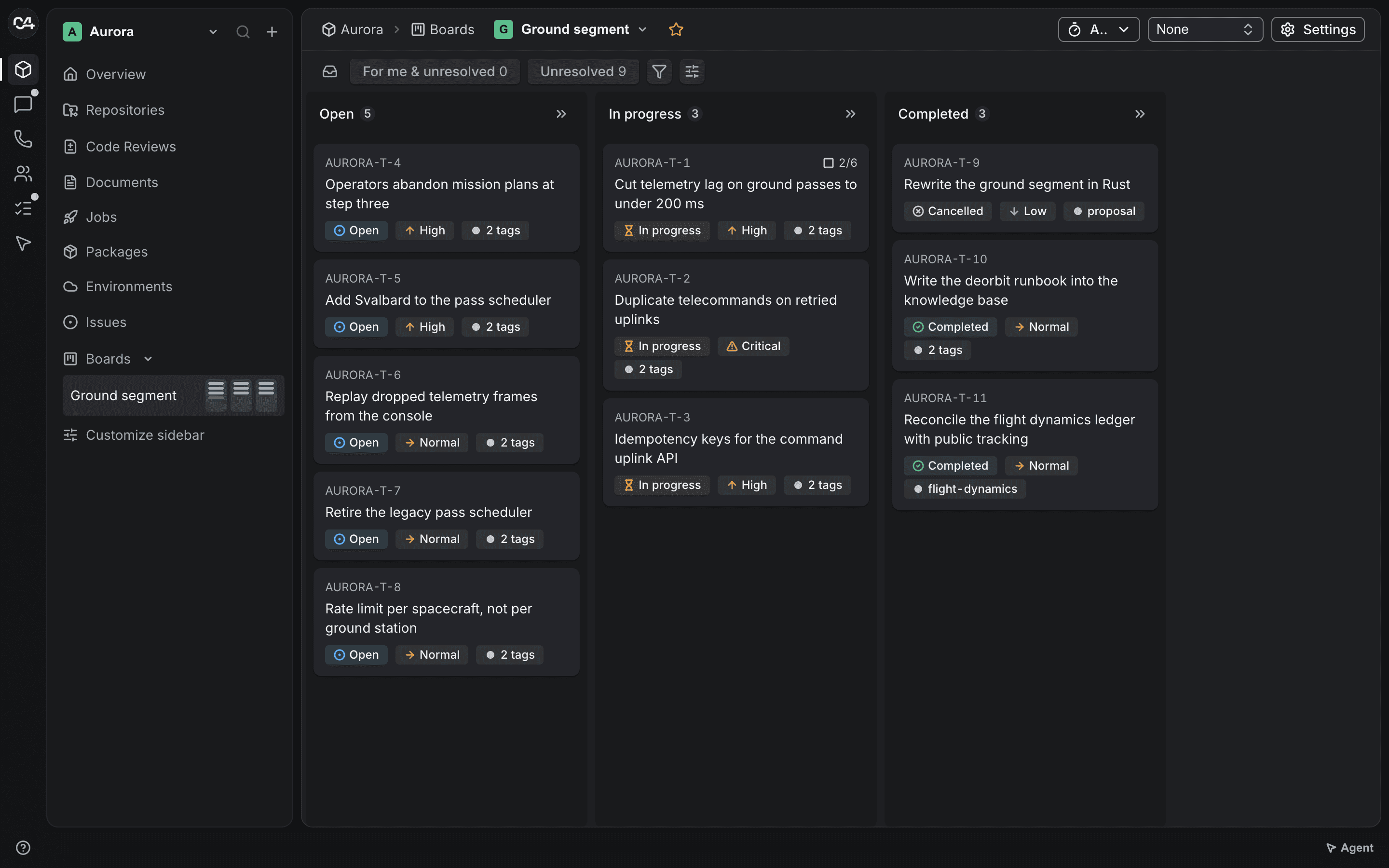
Project board in code4.space with issues grouped into columns by status

Issues and boards

11 custom field types, parent and subtask trees, checklists, watchers, saved filters and bulk edits, with an estimate and a running timer on the issue itself. Boards add columns with WIP limits, sprints, swimlanes and a backlog panel, and cards move by mouse or by keyboard.

Review before merge

Merge requests with per-line threads, comments on a selected range of the diff, suggested edits that land as a commit, reviewer approvals, and a marker showing how much of the diff you have already read.

Documents, chat and calls

Documents live in a folder tree with version history and access rules per node. Chat, threads and video messages sit next to calls with screen sharing and recording. After a call you get a transcript, a summary, chapters and action items with owners, once participants consent.

Repositories on the platform

Git over HTTPS is served by the platform itself: clone, push, branches, tags, file browsing, blame and branch comparison. Protection rules live beside the repository instead of in a separate admin tool.

Pipelines written in code

Steps declare their inputs and outputs, so a run is a graph rather than a list, and a step can run hermetically with a digest-pinned image and an outbound allowlist. You write the pipeline in Java, Go or TypeScript against a typed SDK, and when a step fails you can open a shell in the workspace it left behind. If you would rather not write code, the same SDK compiles a .ci/pipeline.yaml into the same model.

Build to release

Environments, deploys and rollbacks. A deploy can wait for a named person to approve it, and deploys to your own Kubernetes go through an agent inside the cluster, so your kubeconfig never leaves it.

Assistant and agents

An assistant on every screen and an MCP server with more than 150 tools, so Claude Code or any MCP client can read the knowledge base and work with your issues, reviews, pipelines and docs. The in-app assistant shows every tool call and asks before risky actions. An agent you connect over MCP acts with the permissions of the person who signed it in. The branch protection rules you set hold for that agent as they do for that person. Required approvals apply to merge requests, so restrict push to a branch to make a merge request the only way into it.

How it works

  1. Work the way you already do

    Push a repository, open issues, write documents, talk in chat, hold a call. None of it is a knowledge base chore: there is no article editor here and no wiki to keep current.

  2. It is indexed as it lands

    Each of the five sources is split into fragments and indexed as it is written. A call joins the base only if the organization left transcript indexing on and nobody in the room opted out, and it leaves again when the retention window ends.

  3. Ask a question, not a filename

    One pass covers chat, issues, reviews, documents and transcripts, over exactly what you are allowed to open. The answer names the source it came from, so a decision can be traced back to the thread where it was made.

  4. Point an agent at the same base

    The base is an MCP endpoint. An agent signs in as you, reads it, and, when you let it, opens issues, comments on a review or starts a pipeline. Nothing it can reach is anything you could not reach yourself.

Document editor in code4.space with the page tree on the left

Built for small teams that build with AI

Code4 works best for 2 to 20 engineers on a new or young project, where one person can decide how the team works.

  • Dev agencies and studios

    You start client projects often. Give each client one knowledge base, so every decision, review and call stays findable next to the repository, board and pipeline, instead of wiring five tools every time.

  • Early-stage startups

    You are setting up engineering for the first time. Start with one knowledge base that your team and agents share from the first issue, instead of migrating off a patchwork later.

  • Small product teams

    You are a few engineers who already write code with Claude Code, Cursor or Copilot. Give your agent the knowledge base, along with your issues, reviews and pipelines, through one MCP connection.

One knowledge base instead of five disconnected tools

Today: Decisions get lost in calls and chat.
With Code4: Calls are transcribed and summarized with action items, and the transcripts join the knowledge base next to your issues, reviews, documents and chat.
Today: Your coding agent only sees the code.
With Code4: Over MCP it asks the same knowledge base your team does and reads the issue, the review thread and the pipeline logs, through more than 150 tools.
Today: Four or more subscriptions for one small team.
With Code4: Issues, reviews, documents, chat and calls feed one base, with git, CI and deploys beside it under one login and one set of permissions.
Today: Every new project means days of setup.
With Code4: Repository, board, pipeline and environments are created inside the same project, so a new one starts from one place.
Today: You are not ready to let an agent ship alone.
With Code4: An agent you connect over MCP works with the permissions of the person who signed it in. Branch protection holds for it as for that person: restrict push to a branch, and changes reach it only through a merge request with the approvals you require. Protected environments wait for an approval before each deploy.

Design partner program

We are opening Code4 to a small first cohort of teams. You run one real project on one knowledge base that your team and your AI agents share, we work with you directly, and what you need shapes what we build next.

What you get

  • Code4 at no charge for your whole team for the length of the program.
  • A direct line to the founders. Your questions are answered by the people who build the product.
  • Hands-on setup: we connect your repository and your coding agents to the knowledge base, move your first issues with you, and set up your first pipeline and deploy together.
  • Your requests go to the top of the roadmap.
  • A founding-partner discount when you move to a paid plan.

What we ask

  • One real, active project on Code4, not a demo.
  • A 30-minute check-in every week in the first month, then every two weeks.
  • Honest feedback, especially about what is broken or missing.
  • Optionally, a public case study, only if it works for you.

Good fit

  • 2 to 20 engineers
  • A new or young project
  • Already coding with AI tools
  • A founder, CTO or tech lead who can decide

Not the right fit yet

  • Teams that need a security review or compliance certifications before onboarding
  • Regulated data such as healthcare, licensed financial services or government
  • Workflows built deep into another vendor's enterprise tooling
  • Evaluating without a project to run

How to apply

  1. Send a short application by email. The template has nine one-line fields.
  2. Have a 20- to 30-minute fit call with a founder.
  3. Set up the project with us: your repository, the knowledge base for your coding agents over MCP, and your first pipeline and deploy.

If it is not working

You can leave at any time without giving a reason. Your code is in git, so a mirror keeps a full copy at any time, and we export your issues and documents on request.

We reply to every application within 2 business days.

Where it runs

Code4 runs hosted today. Your deploys can still land on your own infrastructure.

Hosted

We run Code4 for you. Access is granted per organization while the alpha is closed, starting with the design partner cohort.

Your cluster

Deploy to your own Kubernetes. An agent inside your cluster pulls deploy jobs, so credentials never leave it.

On your hardware

Need Code4 itself on your own infrastructure? Talk to us about your requirements.

Pricing

Two hosted plans billed per user each month, and enterprise terms on request. Code4 is in a closed alpha: once your organization is given access, we set up the subscription with you and bill it monthly by card through Stripe. Teams in the design partner program use Code4 at no charge during the program and get a founding-partner discount when they move to a paid plan.

  • Team

    Hosted on code4.space, for a team that wants the whole loop in one place.

    12 US dollars per user per month

    • Knowledge base over chat, issues, code reviews, documents and call transcripts
    • Answers through the in-app assistant and over MCP, under your own permissions
    • Git repositories, code review and pipelines as code
    • Issues, boards, sprints, documents, chat and calls
    • Support by email
    Request access
  • Business

    Hosted on code4.space, for an organization that needs answers faster.

    24 US dollars per user per month

    • Everything in Team
    • Priority support by email: your requests are answered first
    Request access
  • Enterprise

    For larger organizations, custom terms and on-premises needs.

    Contact us

    • Terms, seats and invoicing agreed with you
    • Deploys to your own Kubernetes through an agent inside the cluster
    • Code4 on your own infrastructure: talk to us about your requirements
    Contact us
  • Prices are in US dollars. Taxes may apply.
  • Plans are billed monthly. A subscription renews automatically each month until you cancel it.
  • Cancel anytime. Access continues to the end of the period you paid for.

FAQ

  • Do we have to write this knowledge base?

    No, and there is nowhere to write it. The product has no article editor and no wiki section: the index is built from what your team writes anyway, which is chat, issues, code reviews, project documents and call transcripts. The one thing you decide is whether call transcripts join it at all, and any participant can keep a call out.

  • How is this different from a tracker plus a git host plus a CI service?

    One database and one permission model. A question about a decision searches issues, review threads, documents, chat and call transcripts in a single pass, because they are not in four products. Pipelines are typed code in a language you already write, and a YAML file compiles into the same model if you prefer one.

  • Who can see what?

    A document or a folder can be closed to everyone except the people you name, and the creator stays on that list. Search runs the same permission check the screens do, and it is built the other way round from most: the filter is assembled before the query and an empty set of permissions returns nothing, so a private document does not surface as a hint to someone who cannot open it.

  • What does the AI actually do here?

    Four things: it answers questions in a chat panel, it drafts an outline of a code review once an admin turns that on, it writes a summary and a transcript for a call, and it powers search across the organization. It does not autocomplete in an editor. The in-app assistant asks before risky actions, and an agent you connect over MCP acts with the permissions of the person who signed it in.

  • Does our code or our text get sent to a model provider?

    Only what the AI features touch. The assistant and call summaries send their input to Anthropic, speech goes to Deepgram for transcription, and the search index is built with an OpenAI embedding model. Everything else stays in our database and our file storage, as the Privacy Policy says. If the embedding service is unavailable, search keeps answering from the keyword pass alone.

  • We are on another tool. How do we move?

    Repositories move by pushing them: the remote is an ordinary git server over HTTPS, so git push --mirror is the whole job. Issues and documents have no importer yet, and until one exists the REST API and the MCP endpoint are the way in. They are the same interfaces the app itself uses, so nothing is held back from them. During the design partner program we move your first issues and set up your first pipeline with you, by hand.

  • Can we run it on our own hardware?

    Code4 runs hosted today. Your deploys can target your own Kubernetes cluster through an agent that runs inside it, so your kubeconfig never leaves the cluster. If you need Code4 itself on your own hardware, talk to us.

  • Where does it fall short?

    Four known gaps. No importers from other trackers. Documents autosave with a lock rather than letting two people type at once. Call transcription runs in one language, set in configuration rather than picked per call, and there is no way to upload a recording that did not happen here. And it is a web app: layouts collapse for a narrow window, but there is no public mobile app yet.

  • What is the design partner program?

    A small first cohort of teams runs one real project on Code4 at no charge for the length of the program, with one knowledge base that the team and its AI agents share. We help with setup and put your requests first. In return we ask for a short check-in, weekly in the first month and then every two weeks, and honest feedback.

  • What happens when the program ends?

    You choose. Move to a plan on the pricing page with a founding-partner discount, or leave and take your data with you. Nothing is charged until you choose a plan.

  • Do we have to leave GitHub?

    No. Start with one new project on Code4 and keep everything else where it is. Code4 does not sync with GitHub today, so pick a project that can live in one place.

  • What happens to our data if we leave?

    Your code is in git, so a mirror keeps a full copy at any time. Issues and documents are available through the API, and we export them on request. When a paid subscription ends, our terms give you 30 days to ask for an export.

  • Is it safe to let an AI agent near our deploys?

    An agent you connect over MCP works with the permissions of the person who signed it in, so give it the access you are comfortable with. The branch protection rules you set hold for it as for that person. Required approvals apply to merge requests, so restrict push to a branch to make a merge request the only way into it. Protected environments wait for an approval before each deploy. The in-app assistant shows every tool call and asks before risky actions.

  • Can we use Claude Code or Cursor with it?

    Yes. Code4 runs an MCP server: add it to your client, sign in, and your agent works with your permissions across issues, reviews, pipelines, docs and calls.
Apply to the design partner program

Tell us about your team and the project you would start with. A founder reads every application.

Apply as a design partner

This opens an email in your mail app. Nothing is sent until you press Send.

Or write to support@code4.space. We reply to every application within 2 business days. If we record the fit call, we ask you first.